Quit Guessing Your Profits: The OS for 3D Printing Business Success

In the world of 3D printing, there’s a massive gap between being a "maker" and being a "business owner." As a maker, you care about layer heights and wall counts. As a business owner, you care about margins, machine depreciation, and labor costs.
PolymagicPrice was built to bridge this gap. It is the first privacy-first, local-processing "Operating System" designed specifically for 3D printing professionals.
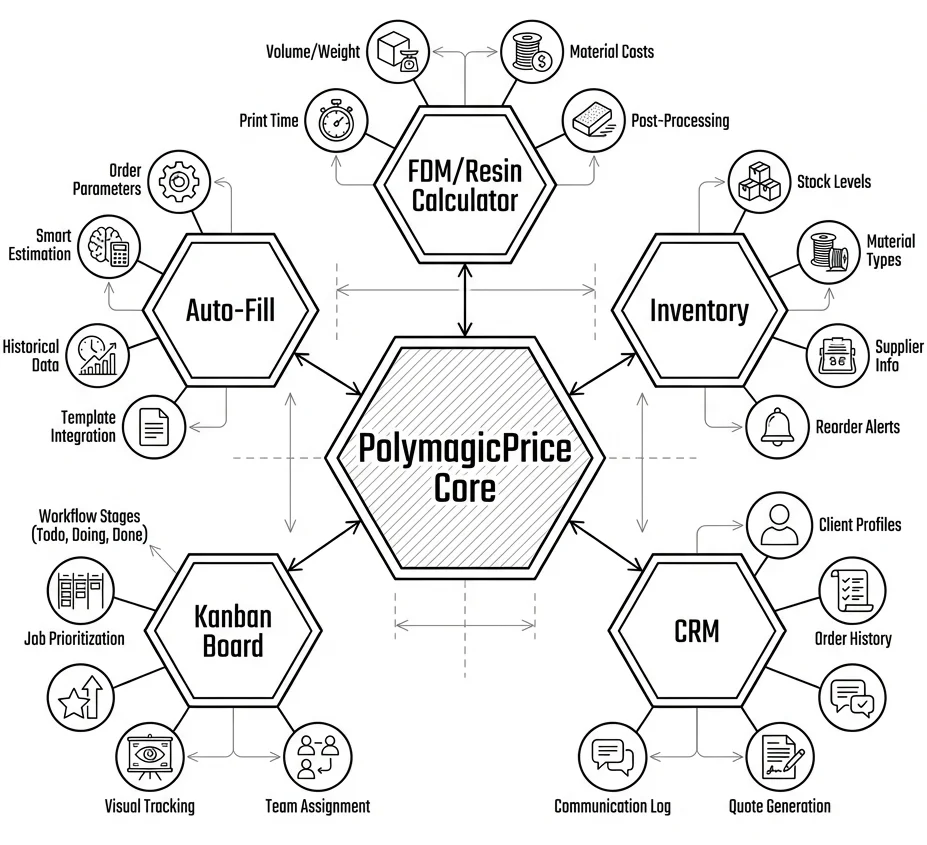
Why PolymagicPrice?
Most 3D printing calculators are too simple. They take your filament cost and multiply it by 3. This approach ignores the real-world overhead that makes or breaks a business:
- Energy usage across varied print durations.
- Maintenance cycles for consumables and wear components.
- Manual labor involved in support removal and finishing.
PolymagicPrice captures these variables, providing you with a data-driven foundation for sustainable pricing.
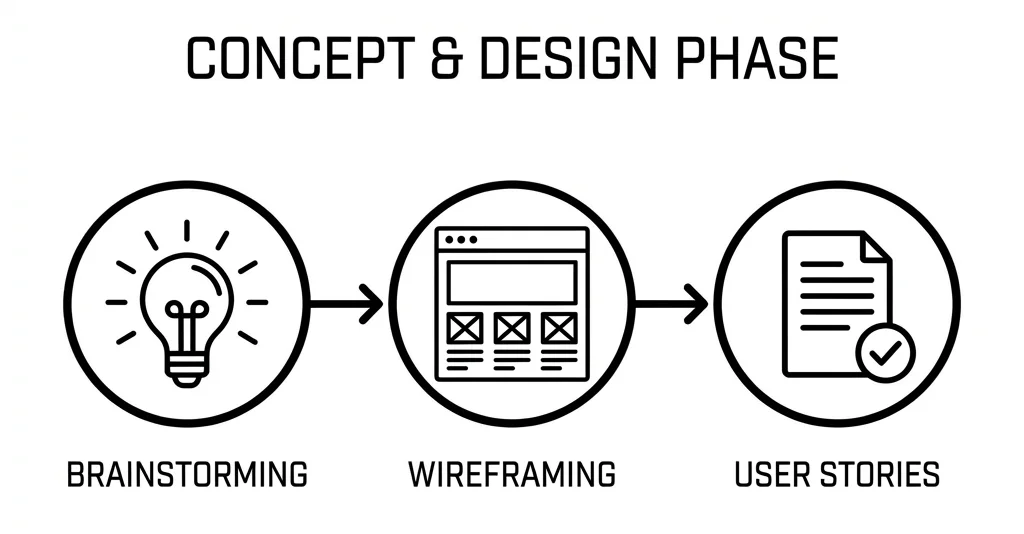
Feature Deep Dive: The Quoting Engine
The heart of the tool is the Smart Quoting Engine, compatible with both FDM (Filament) and Resin (SLA) technologies.
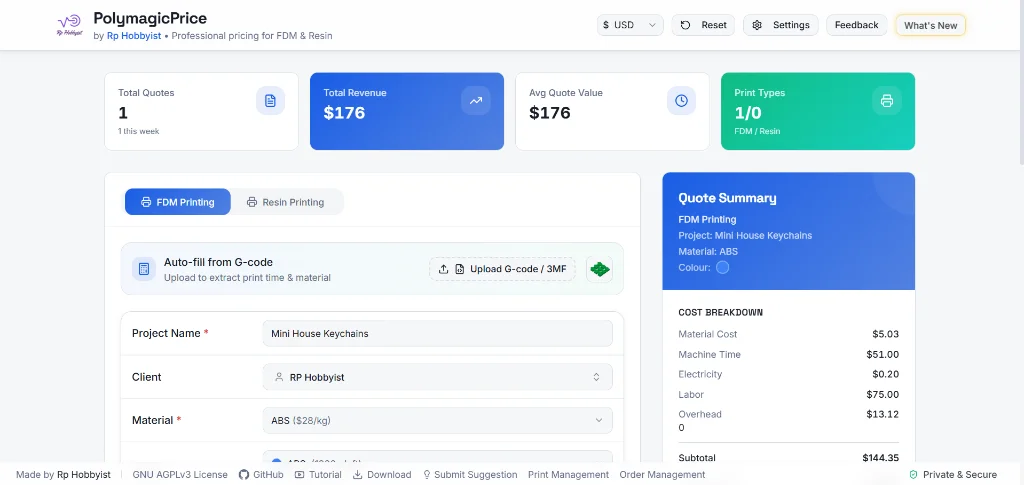
1. G-code & 3MF Automation
Forget manual entry. You can drag and drop your G-code files directly into the calculator. The tool uses a local parser to extract:
- Print Time: Accurate to the minute.
- Material Usage: Filament weight (grams) or Resin volume (ml).
- Printer Model: Automatically matches the file to your saved machines.
- Surface Area Detection: Upload a
.3mffile to instantly calculate the surface area for post-processing costs.
2. Multi-Dimensional Cost Stacking
The calculator doesn't just look at material. It builds a "cost stack" for every project:
- Material Cost:
(Model Weight / Spool Weight) * Spool Cost. - Machine Rate: Calculated based on the machine's lifespan and maintenance costs.
- Electricity: Uses your local $/kWh rate and the machine's actual power draw (Watts).
- Labor: Log your time for prep, printing, and cleanup.
- Overhead & Risk: Add a percentage buffer for "just in case" scenarios.
Business Management Tools
PolymagicPrice is more than a calculator; it’s a management suite.
Inventory & Spool Management
Stop shaking spools to guess if you have enough filament.
- Spool Library: Track spools by material (PLA, PETG, ABS, etc.), brand, color, and weight.
- Live Tracking: When you calculate a quote, the system identifies if you have enough remaining material on your spool.
- Color Tracking: Easily manage dozen of colors and finishes.
Machine Fleet Management
Whether you have one Prusa or a farm of 50 Bambu Labs, you can manage them all.
- Custom Machine Profiles: Set hourly costs and power consumption for each printer.
- Capacity Planning: Use the Capacity Planner to distribute large orders across your fleet and identify bottlenecks.
Team & Employee Management
Scaling your business means hiring help.
- Employee Directory: Track your team members and their job positions.
- Assignment System: Assign specific projects to specific employees, ensuring accountability in your workshop.
Local CRM (Customer Management)
Keep your client data where it belongs - with you.
- Client Profiles: Store names, contact details, and project history.
- Lifetime Value Tracking: Identify your most loyal customers.
Advanced Post-Processing (BETA)
Post-processing is often where profit goes to die. PolymagicPrice includes a dedicated Post-Processing module:
- Painting Logic: Calculate the cost of primer and paint based on the surface area of the model.
- Layering Costs: Factor in multiple coating layers and the labor time required for each.
- Material Usage Rates: Define exactly how many ml of paint are used per cm² for precision quoting.
Privacy & Technology
We believe your business data is your business.
- Local-Only Processing: Unlike "cloud" tools, PolymagicPrice processes everything in your browser. Your G-code, your designs, and your customer names never leave your computer.
- Open Source: Built with React and Vite, licensed under AGPLv3. It is a tool for the community, by the community.

The Conclusion: Know Your Worth
Using a professional tool like PolymagicPrice does more than just give you a number. It gives you professionalism. When a client asks why a print costs \$60 instead of \$20, you can show them a breakdown of material, machine time, labor, and overhead.
Stop guessing. Start profiting.
Get Started with PolymagicPrice
Choose how you want to manage your 3D printing business: instantly in the cloud or securely on your desktop.
Frequently Asked Questions
How do you accurately price a 3D printed part?
A professional quote must account for material weight, machine depreciation rate, electricity usage, estimated failure rate, and manual labor for post-processing - not just the cost of a spool of filament.
Is PolymagicPrice cloud-based or local software?
PolymagicPrice was designed with a privacy-first, local architecture. Your proprietary G-code and client data never leave your machine; all quoting and processing happens directly in your browser or the desktop client.
How does the fleet planner optimize 3D printing farms?
The built-in Capacity Planner uses a Round Robin algorithm to distribute your incoming print queue across your available machines, balancing load times and maximizing overall farm throughput.
How do I accurately calculate the cost of a 3D print?
Accurate cost calculation requires factoring in material weight (filament cost), machine depreciation (wear and tear per hour), electricity usage, and most importantly, operator labor time for setup and post-processing. A tool like PolymagicPrice automates this by parsing G-code.
Why is parsing G-code important for quoting 3D prints?
G-code contains the exact print time and filament usage directly from the slicer. Parsing it eliminates guesswork and manual entry, allowing for highly accurate, instant quotes that protect profit margins.
How can I increase the profit margin of my 3D printing farm?
Increase margins by optimizing machine utilization (printing 24/7), reducing print failure rates through better DFM (Design for Manufacturing), and using accurate pricing models that account for hidden costs like electricity and labor.